
Project Progress #5
December 4, 2023
December 4, 2023
v 10.1
v 10.1
Project Progress #5
December 4, 2023
v 10.1
Setting up the Arduino Nano 33 IoT
This week brought a significant milestone in my project – I finally got my hands on the Arduino Nano 33 IoT. Setting it up was an enlightening challenge; the Nano 33 IoT operates with libraries that are quite different from the traditional Arduino Uno I'm accustomed to. But with patience and determination, I navigated these new waters.
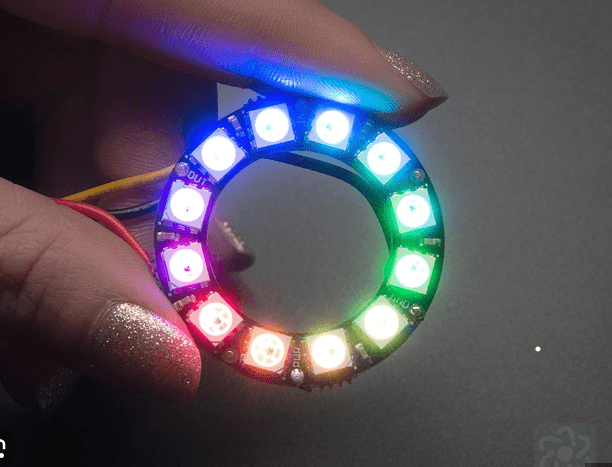
My immediate focus turned to integrating the neopixel ring. Understanding the requirements of each pin was crucial, and after some trial and error, I initially connected it to the 5V pin on the Nano. However, I soon realized that using 5V wasn't as straightforward as I expected with this model. Switching to the 3.3V pin turned out to be the key – my neopixel ring sprang to life!
Next, I aimed to make my connections more robust by soldering them. This task proved unexpectedly challenging; the ITP lab was out of solder, likely due to the increased demand during finals week. After a bit of a scavenger hunt across different labs, I finally found what I needed at the Tandon Makerspace.
With the neopixel ring successfully integrated, I turned my attention to the Adafruit Temperature Sensor IC. I plugged it in and ran the example code, only to be met with disappointment – it didn’t work. I tried tweaking the code, experimenting with different pins, and exhaustively troubleshooting everything from the connections to the power supply, but still, the code wouldn’t upload. In an attempt to isolate the problem, I tried just compiling the code without uploading, but even that failed. It was perplexing that even Adafruit's example code wouldn’t work. Switching the device in the code to an Arduino Uno, the code compiled successfully, which led me to some research. I discovered that others have sometimes faced issues with the Arduino Nano 33 IoT, particularly because it belongs to the SAMD family of devices.
This realization prompted me to consider switching to an analog sensor. This upcoming week, I’ll be diving into exploring this option and figuring out the best way forward. Alongside the technical aspects, I’m also focusing on crafting a compelling story behind my product, which is an integral part of bringing any project to life.
___
Setting up the Arduino Nano 33 IoT
This week brought a significant milestone in my project – I finally got my hands on the Arduino Nano 33 IoT. Setting it up was an enlightening challenge; the Nano 33 IoT operates with libraries that are quite different from the traditional Arduino Uno I'm accustomed to. But with patience and determination, I navigated these new waters.
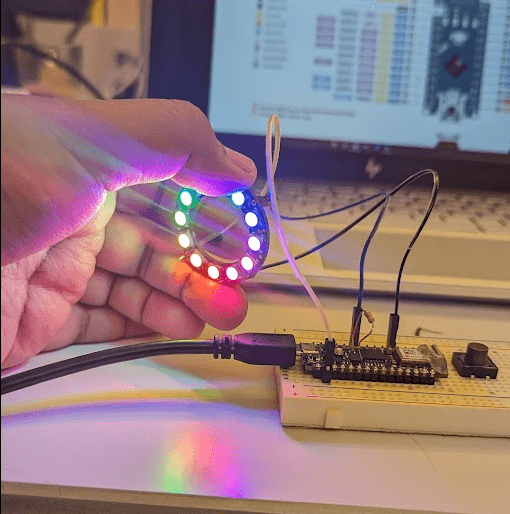
My immediate focus turned to integrating the neopixel ring. Understanding the requirements of each pin was crucial, and after some trial and error, I initially connected it to the 5V pin on the Nano. However, I soon realized that using 5V wasn't as straightforward as I expected with this model. Switching to the 3.3V pin turned out to be the key – my neopixel ring sprang to life!
Next, I aimed to make my connections more robust by soldering them. This task proved unexpectedly challenging; the ITP lab was out of solder, likely due to the increased demand during finals week. After a bit of a scavenger hunt across different labs, I finally found what I needed at the Tandon Makerspace.
With the neopixel ring successfully integrated, I turned my attention to the Adafruit Temperature Sensor IC. I plugged it in and ran the example code, only to be met with disappointment – it didn’t work. I tried tweaking the code, experimenting with different pins, and exhaustively troubleshooting everything from the connections to the power supply, but still, the code wouldn’t upload. In an attempt to isolate the problem, I tried just compiling the code without uploading, but even that failed. It was perplexing that even Adafruit's example code wouldn’t work. Switching the device in the code to an Arduino Uno, the code compiled successfully, which led me to some research. I discovered that others have sometimes faced issues with the Arduino Nano 33 IoT, particularly because it belongs to the SAMD family of devices.
This realization prompted me to consider switching to an analog sensor. This upcoming week, I’ll be diving into exploring this option and figuring out the best way forward. Alongside the technical aspects, I’m also focusing on crafting a compelling story behind my product, which is an integral part of bringing any project to life.
___
Setting up the Arduino Nano 33 IoT
This week brought a significant milestone in my project – I finally got my hands on the Arduino Nano 33 IoT. Setting it up was an enlightening challenge; the Nano 33 IoT operates with libraries that are quite different from the traditional Arduino Uno I'm accustomed to. But with patience and determination, I navigated these new waters.
My immediate focus turned to integrating the neopixel ring. Understanding the requirements of each pin was crucial, and after some trial and error, I initially connected it to the 5V pin on the Nano. However, I soon realized that using 5V wasn't as straightforward as I expected with this model. Switching to the 3.3V pin turned out to be the key – my neopixel ring sprang to life!
Next, I aimed to make my connections more robust by soldering them. This task proved unexpectedly challenging; the ITP lab was out of solder, likely due to the increased demand during finals week. After a bit of a scavenger hunt across different labs, I finally found what I needed at the Tandon Makerspace.
With the neopixel ring successfully integrated, I turned my attention to the Adafruit Temperature Sensor IC. I plugged it in and ran the example code, only to be met with disappointment – it didn’t work. I tried tweaking the code, experimenting with different pins, and exhaustively troubleshooting everything from the connections to the power supply, but still, the code wouldn’t upload. In an attempt to isolate the problem, I tried just compiling the code without uploading, but even that failed. It was perplexing that even Adafruit's example code wouldn’t work. Switching the device in the code to an Arduino Uno, the code compiled successfully, which led me to some research. I discovered that others have sometimes faced issues with the Arduino Nano 33 IoT, particularly because it belongs to the SAMD family of devices.
This realization prompted me to consider switching to an analog sensor. This upcoming week, I’ll be diving into exploring this option and figuring out the best way forward. Alongside the technical aspects, I’m also focusing on crafting a compelling story behind my product, which is an integral part of bringing any project to life.
___