
Project Progress #1
November 5, 2023
November 5, 2023
v 6.1
v 6.1
Project Progress #1
November 5, 2023
v 6.1
Setting up my Raspberry Pi Zero W -The "Headless" Way!

Starting my week with the intention of setting up my Raspberry Pi Zero W, I expected a straightforward process. Armed with the Pi, a power cable, and an SD card, my initial thought was to connect all the usual peripherals—a keyboard, mouse, and monitor. However, I had stumbled upon a 'headless' method, which meant I could set everything up without any extra hardware, controlling the Pi remotely from my laptop through SSH and VNC.
I used the Raspberry Pi Imager to flash the Raspbian legacy OS onto the SD card. Then, I configured SSH and entered my Wi-Fi details, which was not as easy as it sounded. NYU's network policies are quite strict about connecting IoT devices, like my Pi, directly to their Wi-Fi. They do offer a media network that could potentially work for the Pi, but I was at a loss without the MAC address, which wasn't listed anywhere on the Pi or its packaging.
The ITP sandbox Wi-Fi, intended for IoT devices, wasn't an immediate option for me either, due to these limitations. And while my dorm's media Wi-Fi could potentially connect the Pi, my laptop couldn't access it, which meant I wouldn't be on the same network as the Pi.
My workaround involved my Android phone's hotspot feature, which I hoped would bypass NYU's restrictions since it wasn't subject to the same rules. I programmed the SD card with my phone's Wi-Fi details and started up the Pi. For a moment, nothing happened, but then my phone indicated a connection. I successfully pinged "raspberrypi.local" from my terminal, which was a big relief.
However, my excitement was short-lived as I couldn't establish an SSH connection, no matter how many times I tried. I took the SD card out and walked through all possible troubleshooting steps, even seeking guidance from ChatGPT, but to no avail. I suspected the issue might be the dynamic IP allocation from the mobile hotspot, which meant the Pi's IP address could have changed and "raspberrypi.local" didn't point to the correct address anymore.
After several hours of trying and failing, I felt mentally drained. It was a disheartening setback, reminiscent of a time I struggled with an Arduino Uno project that had a tiny, yet persistent bug, which took three days to figure out. The complexity of working with IoT was evident, yet I wasn't ready to throw in the towel.
With fresh resolve, I decided to give it another shot, taking a break for a good part of the next day and returning in the evening to tackle the problem with a clear mind. I'm determined to see this through, confident that I'll find a solution just as I did with my Arduino project. Embarking on another evening of Pi configuration, I was resolute to adopt a more measured approach. Having educated myself with various troubleshooting videos, I had grasped that the Pi needed its due time to boot and load the necessary files from the SD card. Patience was my new tactic, along with a careful handling of the hardware—I was determined not to hastily eject the SD card without properly unmounting it first.
I also resolved to stick with my mobile hotspot, resetting its password to ensure an exclusive connection for my computer and the Pi. With this setup, I powered on the Pi and waited with bated breath. Five minutes ticked by slowly, and then, a new device appeared on my network. Attempt after attempt, pings to "raspberrypi.local" went unanswered. However, I was certain the Pi was connected—nothing else could account for the new device on my network.
I proceeded to download an "Advanced IP Scanner" tool for Windows to survey the devices on my current network. Amidst the various routers belonging to the NYU network, one entry proudly bore the name "Raspberry Pi Corporation." There it was—my elusive device. I immediately noted the MAC address for future reference and was relieved to find the corresponding IP address. I pinged the IP—it responded. An attempt to SSH was successful. The triumph was undeniable; the connection I'd fought to establish felt all the more sweet.
With the MAC address in hand, the dynamic IP was no longer a concern. Should the IP change, the MAC would guide me back to the Pi.
The sense of achievement was profound, an echo of the previous day's victory but amplified. I proceeded with care, updating and upgrading the Pi's software. Even when a required reboot temporarily severed our connection, it was swiftly re-established. My next step was to launch a VNC server. After installing RealVNC's server software on the Pi and its viewer on my laptop, I encountered a few hiccups, but perseverance paid off.
When the remote desktop came into view, adorned with a sunset wallpaper, the realization of what I had accomplished was overwhelming. It was just unimaginable, that so small a device, could work as a full fledged computer. This small, inconspicuous device, the Pi Zero, now fully operational and accessible from my laptop, was a testament to the journey I had embarked upon. The challenges were many, the progress for the week might seem less, but to me, it was a monumental milestone. It bolstered my confidence for the future obstacles and endeavours that lay in wait.
___
Setting up my Raspberry Pi Zero W -The "Headless" Way!
Starting my week with the intention of setting up my Raspberry Pi Zero W, I expected a straightforward process. Armed with the Pi, a power cable, and an SD card, my initial thought was to connect all the usual peripherals—a keyboard, mouse, and monitor. However, I had stumbled upon a 'headless' method, which meant I could set everything up without any extra hardware, controlling the Pi remotely from my laptop through SSH and VNC.
I used the Raspberry Pi Imager to flash the Raspbian legacy OS onto the SD card. Then, I configured SSH and entered my Wi-Fi details, which was not as easy as it sounded. NYU's network policies are quite strict about connecting IoT devices, like my Pi, directly to their Wi-Fi. They do offer a media network that could potentially work for the Pi, but I was at a loss without the MAC address, which wasn't listed anywhere on the Pi or its packaging.
The ITP sandbox Wi-Fi, intended for IoT devices, wasn't an immediate option for me either, due to these limitations. And while my dorm's media Wi-Fi could potentially connect the Pi, my laptop couldn't access it, which meant I wouldn't be on the same network as the Pi.
My workaround involved my Android phone's hotspot feature, which I hoped would bypass NYU's restrictions since it wasn't subject to the same rules. I programmed the SD card with my phone's Wi-Fi details and started up the Pi. For a moment, nothing happened, but then my phone indicated a connection. I successfully pinged "raspberrypi.local" from my terminal, which was a big relief.
However, my excitement was short-lived as I couldn't establish an SSH connection, no matter how many times I tried. I took the SD card out and walked through all possible troubleshooting steps, even seeking guidance from ChatGPT, but to no avail. I suspected the issue might be the dynamic IP allocation from the mobile hotspot, which meant the Pi's IP address could have changed and "raspberrypi.local" didn't point to the correct address anymore.
After several hours of trying and failing, I felt mentally drained. It was a disheartening setback, reminiscent of a time I struggled with an Arduino Uno project that had a tiny, yet persistent bug, which took three days to figure out. The complexity of working with IoT was evident, yet I wasn't ready to throw in the towel.
With fresh resolve, I decided to give it another shot, taking a break for a good part of the next day and returning in the evening to tackle the problem with a clear mind. I'm determined to see this through, confident that I'll find a solution just as I did with my Arduino project. Embarking on another evening of Pi configuration, I was resolute to adopt a more measured approach. Having educated myself with various troubleshooting videos, I had grasped that the Pi needed its due time to boot and load the necessary files from the SD card. Patience was my new tactic, along with a careful handling of the hardware—I was determined not to hastily eject the SD card without properly unmounting it first.
I also resolved to stick with my mobile hotspot, resetting its password to ensure an exclusive connection for my computer and the Pi. With this setup, I powered on the Pi and waited with bated breath. Five minutes ticked by slowly, and then, a new device appeared on my network. Attempt after attempt, pings to "raspberrypi.local" went unanswered. However, I was certain the Pi was connected—nothing else could account for the new device on my network.
I proceeded to download an "Advanced IP Scanner" tool for Windows to survey the devices on my current network. Amidst the various routers belonging to the NYU network, one entry proudly bore the name "Raspberry Pi Corporation." There it was—my elusive device. I immediately noted the MAC address for future reference and was relieved to find the corresponding IP address. I pinged the IP—it responded. An attempt to SSH was successful. The triumph was undeniable; the connection I'd fought to establish felt all the more sweet.
With the MAC address in hand, the dynamic IP was no longer a concern. Should the IP change, the MAC would guide me back to the Pi.
The sense of achievement was profound, an echo of the previous day's victory but amplified. I proceeded with care, updating and upgrading the Pi's software. Even when a required reboot temporarily severed our connection, it was swiftly re-established. My next step was to launch a VNC server. After installing RealVNC's server software on the Pi and its viewer on my laptop, I encountered a few hiccups, but perseverance paid off.
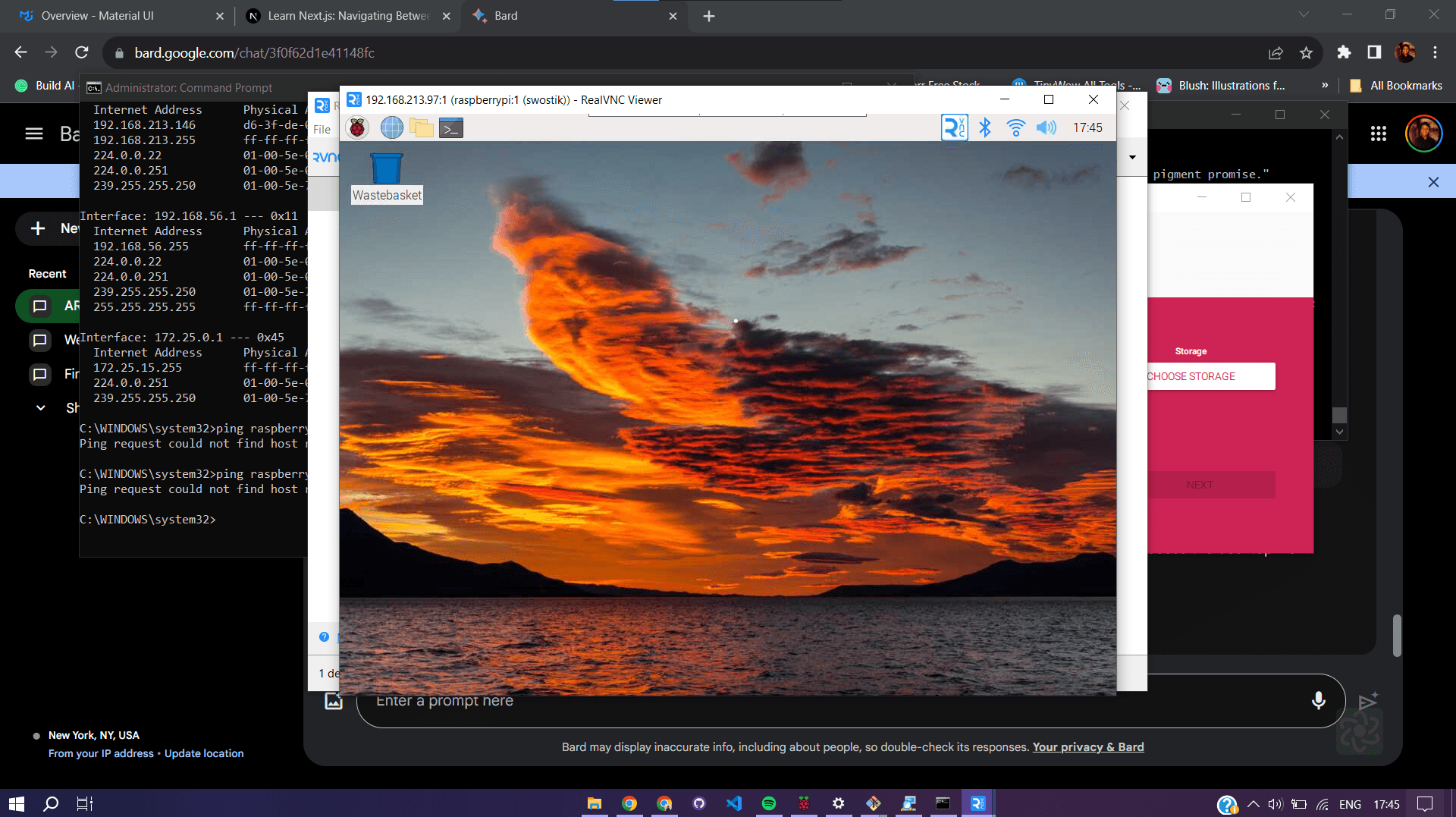
When the remote desktop came into view, adorned with a sunset wallpaper, the realization of what I had accomplished was overwhelming. It was just unimaginable, that so small a device, could work as a full fledged computer. This small, inconspicuous device, the Pi Zero, now fully operational and accessible from my laptop, was a testament to the journey I had embarked upon. The challenges were many, the progress for the week might seem less, but to me, it was a monumental milestone. It bolstered my confidence for the future obstacles and endeavours that lay in wait.
___
Setting up my Raspberry Pi Zero W -The "Headless" Way!
Starting my week with the intention of setting up my Raspberry Pi Zero W, I expected a straightforward process. Armed with the Pi, a power cable, and an SD card, my initial thought was to connect all the usual peripherals—a keyboard, mouse, and monitor. However, I had stumbled upon a 'headless' method, which meant I could set everything up without any extra hardware, controlling the Pi remotely from my laptop through SSH and VNC.
I used the Raspberry Pi Imager to flash the Raspbian legacy OS onto the SD card. Then, I configured SSH and entered my Wi-Fi details, which was not as easy as it sounded. NYU's network policies are quite strict about connecting IoT devices, like my Pi, directly to their Wi-Fi. They do offer a media network that could potentially work for the Pi, but I was at a loss without the MAC address, which wasn't listed anywhere on the Pi or its packaging.
The ITP sandbox Wi-Fi, intended for IoT devices, wasn't an immediate option for me either, due to these limitations. And while my dorm's media Wi-Fi could potentially connect the Pi, my laptop couldn't access it, which meant I wouldn't be on the same network as the Pi.
My workaround involved my Android phone's hotspot feature, which I hoped would bypass NYU's restrictions since it wasn't subject to the same rules. I programmed the SD card with my phone's Wi-Fi details and started up the Pi. For a moment, nothing happened, but then my phone indicated a connection. I successfully pinged "raspberrypi.local" from my terminal, which was a big relief.
However, my excitement was short-lived as I couldn't establish an SSH connection, no matter how many times I tried. I took the SD card out and walked through all possible troubleshooting steps, even seeking guidance from ChatGPT, but to no avail. I suspected the issue might be the dynamic IP allocation from the mobile hotspot, which meant the Pi's IP address could have changed and "raspberrypi.local" didn't point to the correct address anymore.
After several hours of trying and failing, I felt mentally drained. It was a disheartening setback, reminiscent of a time I struggled with an Arduino Uno project that had a tiny, yet persistent bug, which took three days to figure out. The complexity of working with IoT was evident, yet I wasn't ready to throw in the towel.
With fresh resolve, I decided to give it another shot, taking a break for a good part of the next day and returning in the evening to tackle the problem with a clear mind. I'm determined to see this through, confident that I'll find a solution just as I did with my Arduino project. Embarking on another evening of Pi configuration, I was resolute to adopt a more measured approach. Having educated myself with various troubleshooting videos, I had grasped that the Pi needed its due time to boot and load the necessary files from the SD card. Patience was my new tactic, along with a careful handling of the hardware—I was determined not to hastily eject the SD card without properly unmounting it first.
I also resolved to stick with my mobile hotspot, resetting its password to ensure an exclusive connection for my computer and the Pi. With this setup, I powered on the Pi and waited with bated breath. Five minutes ticked by slowly, and then, a new device appeared on my network. Attempt after attempt, pings to "raspberrypi.local" went unanswered. However, I was certain the Pi was connected—nothing else could account for the new device on my network.
I proceeded to download an "Advanced IP Scanner" tool for Windows to survey the devices on my current network. Amidst the various routers belonging to the NYU network, one entry proudly bore the name "Raspberry Pi Corporation." There it was—my elusive device. I immediately noted the MAC address for future reference and was relieved to find the corresponding IP address. I pinged the IP—it responded. An attempt to SSH was successful. The triumph was undeniable; the connection I'd fought to establish felt all the more sweet.
With the MAC address in hand, the dynamic IP was no longer a concern. Should the IP change, the MAC would guide me back to the Pi.
The sense of achievement was profound, an echo of the previous day's victory but amplified. I proceeded with care, updating and upgrading the Pi's software. Even when a required reboot temporarily severed our connection, it was swiftly re-established. My next step was to launch a VNC server. After installing RealVNC's server software on the Pi and its viewer on my laptop, I encountered a few hiccups, but perseverance paid off.
When the remote desktop came into view, adorned with a sunset wallpaper, the realization of what I had accomplished was overwhelming. It was just unimaginable, that so small a device, could work as a full fledged computer. This small, inconspicuous device, the Pi Zero, now fully operational and accessible from my laptop, was a testament to the journey I had embarked upon. The challenges were many, the progress for the week might seem less, but to me, it was a monumental milestone. It bolstered my confidence for the future obstacles and endeavours that lay in wait.
___